«
October 16, 2011 | 5:31 AM

Ada yang tanya, macam mana nak buat post title kat blogskin template boleh di click? Korang tengok post title yana, boleh click kan? Nak buat tu senang je. Just ikut step kat bawah nie dah okay :)
1. Dashboard > Template
2. Ctrl + F, search for this code :
<$BlogItemTitle$>
3. Jumpa? Delete that code and REPLACE with this code :
<span class="PostTitle"><a href="<$BlogItemPermalinkURL$>"><$BlogItemTitle$></a></span>
4. Save Template. Siap!^^
Lots of LoveYana♥Labels: blogskin, classic template, enable, link, post title, tutorial
October 14, 2011 | 4:52 AM
Ada sesetengah template blogskin, dia punya comment link tak berfungsi. So, bagi mengatasi masalah ini, kita haruslah mengikut langkah-langkah atau inisiatif-inisiatif seperti di bawah \ayat karangan BM SPM. luls XD/
1. Dashboard > Template
2. Ctrl + F, search for this code :
<$BlogItemBody$>
3. Copy and paste this code AFTER code <$BlogItemBody$>
<center><a href="<$BlogItemCommentCreate$>"<$BlogItemCommentFormOnClick$>> <span style="font-size: 7.5pt; background-color:#ffffff; padding: 4px; text-transform: uppercase;"><$BlogItemCommentCount$> Comment(s) </span></a></BlogItemCommentsEnabled>
#yang merah tu boleh tukar kalau nak.##kalau korang dah ada code nie, sila skip step ni. Just proceed to the next step.
4. Then, korang pegi ke Setting > Comments > Comment Form Placement > Tick Pop-up window
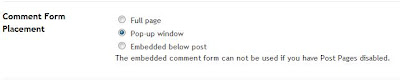
Save dan lihat hasilnya :D
Update
Kalau korang malas nak buat kerja banyak2 kali, korang boleh guna cara kat bawah nie untuk buat comment box tu berfungsi. Credit to Qay :)
1. Dashboard > Template
2. Ctrl + F, search for this code :
</blogger>
3. Jumpa? Copy this code and paste BEFORE </blogger>
<BlogItemCommentsEnabled><a class="comments" href="https://www.blogger.com/comment.g?blogID=YOUR BLOG ID&postID=<$BlogItemNumber$>&isPopup=true" onclick="window.open('https://www.blogger.com/comment.g?blogID=YOUR BLOG ID&postID=<$BlogItemNumber$>&isPopup=true', 'bloggerPopup', 'toolbar=0,scrollbars=1,location=0,statusbar=1,menubar=0,resizable=1,width=250,height=360');return false;"><$BlogItemCommentCount$> comment(s)</a></BlogItemCommentsEnabled>
#yang merah tu tukar dengan blog ID korang. Tak tau nak amek kat mane? Tengok kat SINI.#yang biru boleh tukar dengan ayat korang.
Lots of LoveYana♥Labels: add, blogskin, classic template, comment, enable, how to, inline, tutorial